

PC Health
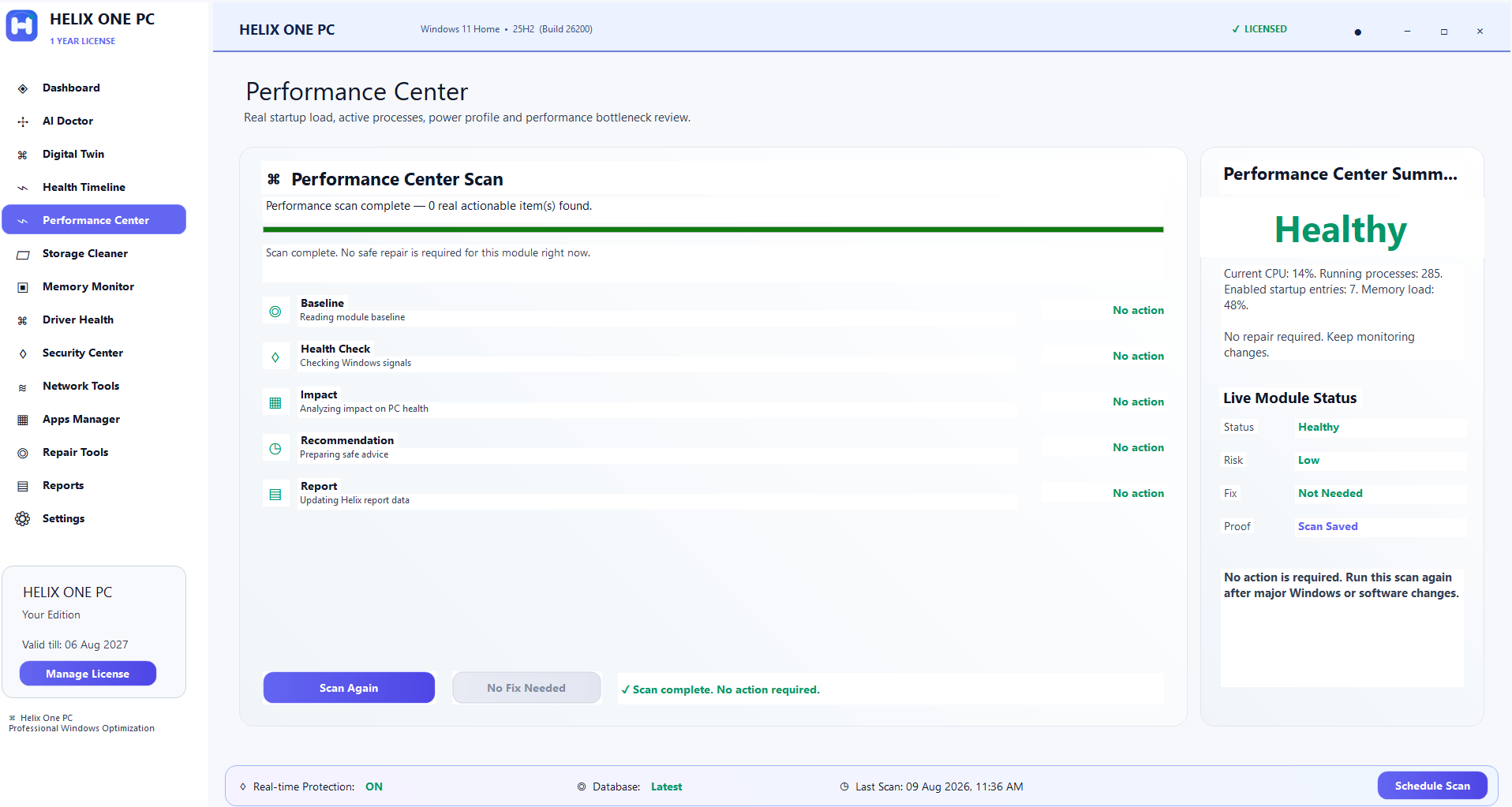
Review CPU, memory, storage, startup, network and other useful Windows health signals.
Check PC health, review startup and storage, use supported repair workflows, monitor driver health and manage software from one Windows dashboard.

Use the tools you need without jumping between separate utilities.
Review CPU, memory, storage, startup, network and other useful Windows health signals.
Review supported cleanup targets and startup items before making changes.
Run supported Windows repair and maintenance workflows with user approval.
Review driver-related system information and supported diagnostic checks.
Review installed programs and access integrated software-removal tools.
Use supported security checks plus activation, account and customer-support tools.
Clear product information, practical Windows guidance and transparent purchase context.
Helix One PC brings common Windows health and maintenance tasks into one interface. Instead of presenting a single score as the whole story, the software is designed to help a user review system areas such as startup behavior, storage usage, memory pressure, processor activity, driver health, installed applications and supported Windows maintenance actions. The goal is to make routine PC care easier to understand before the user approves a change.
For Helix One PC, the important principle is clarity: review what the tool reports, understand the proposed action, and keep control of changes. Windows configurations differ between computers, so results and available actions can vary by device, Windows version, installed software and user permissions.
Helix One PC documentation and support pages are intended to explain the workflow in plain language. Customers can use the navigation above to compare features, pricing, downloads and support information without leaving the product website.
A useful PC health check should help explain what is happening on the computer. Helix One PC organizes system information so users can review relevant signals and decide what needs attention. High resource usage can have many causes, so the product avoids promising that one click will solve every Windows problem. It gives users a clearer starting point for troubleshooting and maintenance.
For Helix One PC, the important principle is clarity: review what the tool reports, understand the proposed action, and keep control of changes. Windows configurations differ between computers, so results and available actions can vary by device, Windows version, installed software and user permissions.
Helix One PC documentation and support pages are intended to explain the workflow in plain language. Customers can use the navigation above to compare features, pricing, downloads and support information without leaving the product website.
Windows PCs can feel slow when too many programs launch automatically, background applications compete for resources, or storage becomes constrained. Helix One PC provides a central place to review supported startup and performance information. Users remain in control of changes, which is important because an application that looks unnecessary may still be required for a particular workflow.
For Helix One PC, the important principle is clarity: review what the tool reports, understand the proposed action, and keep control of changes. Windows configurations differ between computers, so results and available actions can vary by device, Windows version, installed software and user permissions.
Helix One PC documentation and support pages are intended to explain the workflow in plain language. Customers can use the navigation above to compare features, pricing, downloads and support information without leaving the product website.
Temporary data and other supported cleanup targets can consume disk space over time. The cleanup workflow is intended to help users review appropriate targets before removal. The product does not present every file as disposable; the emphasis is on understandable, user-approved maintenance rather than aggressive deletion.
For Helix One PC, the important principle is clarity: review what the tool reports, understand the proposed action, and keep control of changes. Windows configurations differ between computers, so results and available actions can vary by device, Windows version, installed software and user permissions.
Helix One PC documentation and support pages are intended to explain the workflow in plain language. Customers can use the navigation above to compare features, pricing, downloads and support information without leaving the product website.
Windows includes built-in maintenance and repair capabilities that can help in supported scenarios. Helix One PC groups supported workflows into a more approachable interface. Repair tools are not represented as a guarantee for hardware failure, malware infection or every possible Windows fault. Important files should still be backed up before significant system changes.
For Helix One PC, the important principle is clarity: review what the tool reports, understand the proposed action, and keep control of changes. Windows configurations differ between computers, so results and available actions can vary by device, Windows version, installed software and user permissions.
Helix One PC documentation and support pages are intended to explain the workflow in plain language. Customers can use the navigation above to compare features, pricing, downloads and support information without leaving the product website.
Drivers connect Windows with hardware. Problems can arise from incompatible, damaged or outdated components, but blindly replacing drivers is not always the correct solution. Helix One PC helps surface driver-related information and supported checks so the user can make a more informed decision.
For Helix One PC, the important principle is clarity: review what the tool reports, understand the proposed action, and keep control of changes. Windows configurations differ between computers, so results and available actions can vary by device, Windows version, installed software and user permissions.
Helix One PC documentation and support pages are intended to explain the workflow in plain language. Customers can use the navigation above to compare features, pricing, downloads and support information without leaving the product website.
Installed-program review makes it easier to understand what is present on a PC. Helix One PC provides software-management access alongside the rest of the health dashboard. Customers who primarily need deeper removal workflows can also choose the separate Helix One PC Uninstaller Pro product.
For Helix One PC, the important principle is clarity: review what the tool reports, understand the proposed action, and keep control of changes. Windows configurations differ between computers, so results and available actions can vary by device, Windows version, installed software and user permissions.
Helix One PC documentation and support pages are intended to explain the workflow in plain language. Customers can use the navigation above to compare features, pricing, downloads and support information without leaving the product website.
Helix One PC is sold as a Windows software license with plan information displayed before checkout. Product pages distinguish new-license and renewal choices so customers can select the option that matches their situation. Electronic delivery, activation information and support resources are integrated into the website experience.
For Helix One PC, the important principle is clarity: review what the tool reports, understand the proposed action, and keep control of changes. Windows configurations differ between computers, so results and available actions can vary by device, Windows version, installed software and user permissions.
Helix One PC documentation and support pages are intended to explain the workflow in plain language. Customers can use the navigation above to compare features, pricing, downloads and support information without leaving the product website.
The software is intended for Windows users who want a more organized way to review PC health and perform supported maintenance. It can be useful for home users, professionals and small-business users who prefer one dashboard instead of opening multiple Windows utilities for routine checks. App compatibility does not mean the operating system is still supported by Microsoft: standard Windows 10 support ended on October 14, 2025. Check Microsoft’s current lifecycle information for your edition and update eligibility.
For Helix One PC, the important principle is clarity: review what the tool reports, understand the proposed action, and keep control of changes. Windows configurations differ between computers, so results and available actions can vary by device, Windows version, installed software and user permissions.
Helix One PC documentation and support pages are intended to explain the workflow in plain language. Customers can use the navigation above to compare features, pricing, downloads and support information without leaving the product website.
Performance software should set realistic expectations. Internet speed, failing hardware, insufficient RAM, third-party application bugs and other external factors cannot always be corrected by a maintenance utility. Helix One PC therefore focuses its product language on supported checks and actions rather than guaranteed speed increases.
For Helix One PC, the important principle is clarity: review what the tool reports, understand the proposed action, and keep control of changes. Windows configurations differ between computers, so results and available actions can vary by device, Windows version, installed software and user permissions.
Helix One PC documentation and support pages are intended to explain the workflow in plain language. Customers can use the navigation above to compare features, pricing, downloads and support information without leaving the product website.
No. Performance depends on hardware, Windows, applications, background services and other factors. The software provides supported diagnostic and maintenance tools rather than a guaranteed speed increase.
Users should review changes first and keep backups of important data. A recommendation or detected item is not automatically proof that it should be removed.
The current product pages are designed around Windows 10 and Windows 11 PCs. Exact feature availability can depend on the computer and Windows configuration.
Use the Contact and support options available throughout the Helix One PC website. Keep your purchase email and order information available when asking about licensing or activation.
No. Helix One PC and Helix One PC Uninstaller Pro are presented as separate products and have separate purchase paths.
Helix One PC groups Windows health and maintenance checks into one interface so you can review performance signals before choosing an action. It does not replace hardware diagnostics, professional data recovery or Windows security protections.
Start with the slow PC diagnostic guide or review safe PC optimization principles.