
Installed Programs
Review installed software, publishers, versions and available uninstall information.
Review installed software, launch supported uninstallers and check supported leftovers in a focused Windows removal workflow.
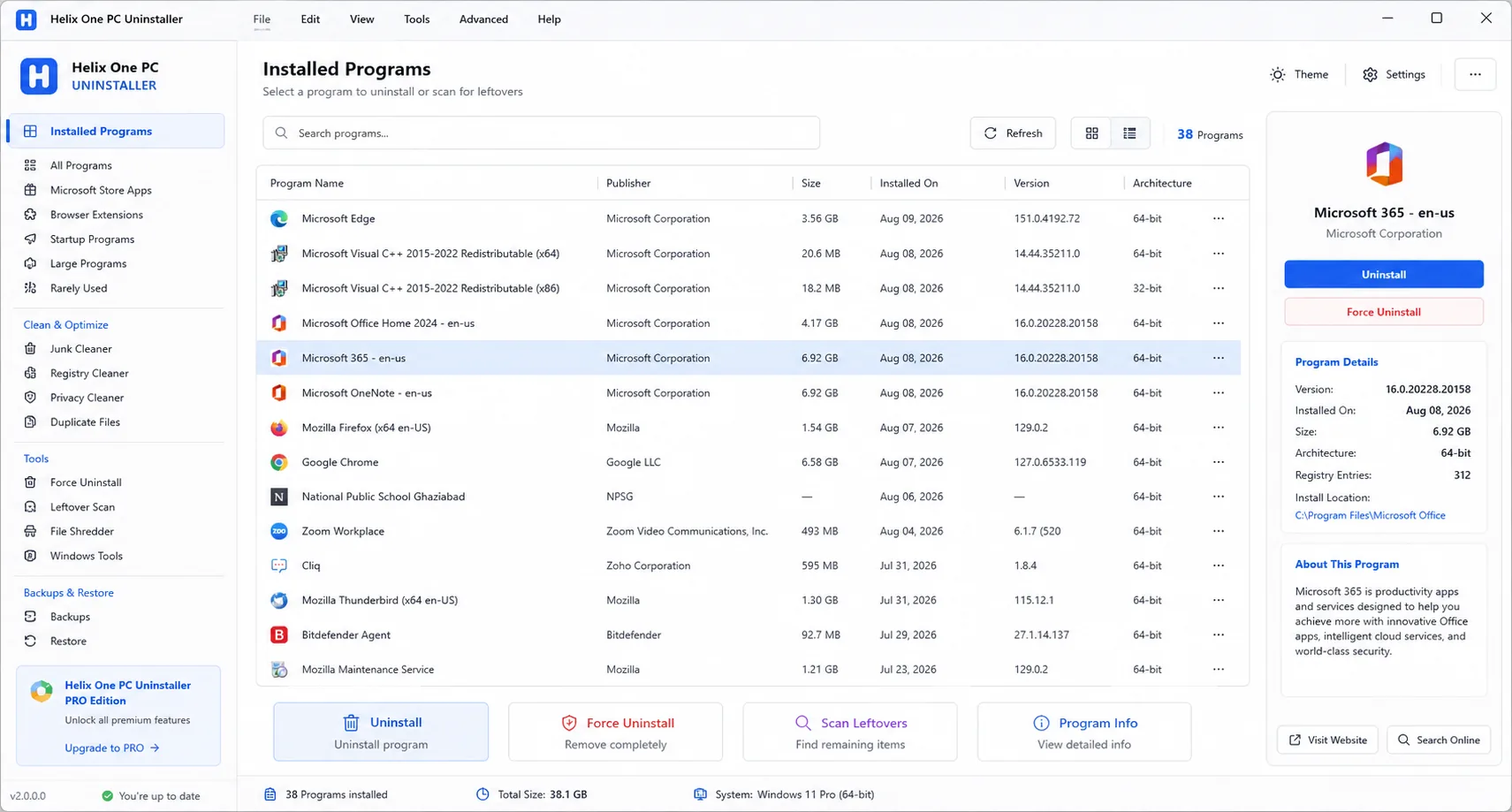
Choose Helix One PC Uninstaller Pro when you mainly need application-removal tools rather than the complete Helix One PC suite.
Review installed software, publishers, versions and available uninstall information.
Check supported file and configuration locations after an uninstall before cleanup.
Prefer official uninstallers first and use supported additional workflows when needed.
A focused Windows uninstaller for 1 PC with installed-program review, supported uninstall workflows and supported leftover review.
Clear product information, practical Windows guidance and transparent purchase context.
Helix One PC Uninstaller Pro is a separate product for customers who want a focused way to review installed Windows applications and run supported removal workflows. It is not simply another pricing option for Helix One PC. Its page, license, download and checkout information are presented separately so customers know exactly what they are buying.
For Helix One PC Uninstaller Pro, the important principle is clarity: review what the tool reports, understand the proposed action, and keep control of changes. Windows configurations differ between computers, so results and available actions can vary by device, Windows version, installed software and user permissions.
Helix One PC documentation and support pages are intended to explain the workflow in plain language. Customers can use the navigation above to compare features, pricing, downloads and support information without leaving the product website.
Removing software is easier when the user can first identify the application and understand the intended action. The Uninstaller Pro workflow is designed around review before removal. This reduces confusion and keeps the customer in control of the uninstall process.
For Helix One PC Uninstaller Pro, the important principle is clarity: review what the tool reports, understand the proposed action, and keep control of changes. Windows configurations differ between computers, so results and available actions can vary by device, Windows version, installed software and user permissions.
Helix One PC documentation and support pages are intended to explain the workflow in plain language. Customers can use the navigation above to compare features, pricing, downloads and support information without leaving the product website.
Some desktop applications can leave supported files or settings behind after their normal uninstaller finishes. Where supported, the product can help review leftovers associated with the removal workflow. Leftover scanning is presented carefully because unrelated files should not be deleted simply because they appear near an application directory.
For Helix One PC Uninstaller Pro, the important principle is clarity: review what the tool reports, understand the proposed action, and keep control of changes. Windows configurations differ between computers, so results and available actions can vary by device, Windows version, installed software and user permissions.
Helix One PC documentation and support pages are intended to explain the workflow in plain language. Customers can use the navigation above to compare features, pricing, downloads and support information without leaving the product website.
A normal vendor uninstaller is generally the preferred first step. For supported cases where an ordinary uninstall cannot be launched or completed, Uninstaller Pro provides an additional workflow. The feature is not described as a universal method for bypassing Windows protections or removing every application.
For Helix One PC Uninstaller Pro, the important principle is clarity: review what the tool reports, understand the proposed action, and keep control of changes. Windows configurations differ between computers, so results and available actions can vary by device, Windows version, installed software and user permissions.
Helix One PC documentation and support pages are intended to explain the workflow in plain language. Customers can use the navigation above to compare features, pricing, downloads and support information without leaving the product website.
Software removal can affect application data and settings. The interface emphasizes backup and restore awareness so users can consider recovery before making significant changes. Customers should preserve important personal and business data independently of any uninstall utility.
For Helix One PC Uninstaller Pro, the important principle is clarity: review what the tool reports, understand the proposed action, and keep control of changes. Windows configurations differ between computers, so results and available actions can vary by device, Windows version, installed software and user permissions.
Helix One PC documentation and support pages are intended to explain the workflow in plain language. Customers can use the navigation above to compare features, pricing, downloads and support information without leaving the product website.
The product page clearly identifies the supported Windows family so visitors can assess compatibility before purchase. Hardware, Windows configuration and third-party software can vary, which is why compatibility and feature availability should be reviewed before relying on a specific workflow.
For Helix One PC Uninstaller Pro, the important principle is clarity: review what the tool reports, understand the proposed action, and keep control of changes. Windows configurations differ between computers, so results and available actions can vary by device, Windows version, installed software and user permissions.
Helix One PC documentation and support pages are intended to explain the workflow in plain language. Customers can use the navigation above to compare features, pricing, downloads and support information without leaving the product website.
Helix One PC Helix One PC Uninstaller Pro is shown as its own product with its own $19.99 USD purchase path. The checkout area explains the license and electronic-delivery process without mixing the Uninstaller offer with the main Helix One PC plans.
For Helix One PC Uninstaller Pro, the important principle is clarity: review what the tool reports, understand the proposed action, and keep control of changes. Windows configurations differ between computers, so results and available actions can vary by device, Windows version, installed software and user permissions.
Helix One PC documentation and support pages are intended to explain the workflow in plain language. Customers can use the navigation above to compare features, pricing, downloads and support information without leaving the product website.
The official Uninstaller package in this website build uses the installer name HelixOnePCUninstaller_Setup.exe. Keeping a clear installer name makes the download easier for customers to recognize and keeps the website, support instructions and product identity consistent.
For Helix One PC Uninstaller Pro, the important principle is clarity: review what the tool reports, understand the proposed action, and keep control of changes. Windows configurations differ between computers, so results and available actions can vary by device, Windows version, installed software and user permissions.
Helix One PC documentation and support pages are intended to explain the workflow in plain language. Customers can use the navigation above to compare features, pricing, downloads and support information without leaving the product website.
Customers should be able to find contact information, policies and account resources without hunting through the site. The global navigation and footer therefore remain consistent on the Uninstaller page as well as the main product pages.
For Helix One PC Uninstaller Pro, the important principle is clarity: review what the tool reports, understand the proposed action, and keep control of changes. Windows configurations differ between computers, so results and available actions can vary by device, Windows version, installed software and user permissions.
Helix One PC documentation and support pages are intended to explain the workflow in plain language. Customers can use the navigation above to compare features, pricing, downloads and support information without leaving the product website.
Choose Helix One PC when you want the broader PC health, performance, maintenance and repair workspace. Choose Helix One PC Uninstaller Pro when your primary requirement is installed-application review and supported software-removal workflows. The pricing page compares these separate purchase paths.
For Helix One PC Uninstaller Pro, the important principle is clarity: review what the tool reports, understand the proposed action, and keep control of changes. Windows configurations differ between computers, so results and available actions can vary by device, Windows version, installed software and user permissions.
Helix One PC documentation and support pages are intended to explain the workflow in plain language. Customers can use the navigation above to compare features, pricing, downloads and support information without leaving the product website.
No. Performance depends on hardware, Windows, applications, background services and other factors. The software provides supported diagnostic and maintenance tools rather than a guaranteed speed increase.
Users should review changes first and keep backups of important data. A recommendation or detected item is not automatically proof that it should be removed.
The current product pages are designed around Windows 10 and Windows 11 PCs. Exact feature availability can depend on the computer and Windows configuration.
Use the Contact and support options available throughout the Helix One PC website. Keep your purchase email and order information available when asking about licensing or activation.
No. Helix One PC and Helix One PC Uninstaller Pro are presented as separate products and have separate purchase paths.